
Can you play old Blossom Word Game puzzles? Yes — here’s how the archive works, where to find past puzzles, how far back they go, and how to use them to improve.
You missed yesterday’s puzzle. Or you played it but found only seven words and want to know what you were missing. Or you’re just curious whether there’s a record of every letter set that’s ever appeared — a way to look back, study patterns, and practice against real puzzles rather than hypothetical ones.
The question “can you play old Blossom puzzles?” comes up more than you’d expect. And the answer is more nuanced than a simple yes or no — it depends on which platform you’re using, what “playing” means to you, and what you’re actually hoping to get from the archive.
This guide covers everything: which platforms have archives, what those archives actually contain (answers-only vs. interactive play), how far back they go, how to navigate them, and — most importantly — how to use archive puzzles as a genuine training tool rather than just a curiosity.
Can You Play Old Blossom Puzzles?
⚡ Quick Answer: Yes — past Blossom puzzles are accessible through archive features on several platforms, most notably BlossomSpellingGame.com. The archive typically shows previous letter sets, all valid words, pangrams, and scoring information. Whether you can play them interactively (entering words and receiving feedback) versus simply viewing past answers varies by platform. BlossomSpellingGame.com offers an archive you can explore through its “View Full Month Result” feature.
The distinction between “viewing the archive” and “playing old puzzles interactively” is the most important thing to understand upfront. Most archive implementations give you the complete information about a past puzzle — all the words, the pangram, the letter set — but in a browse/review format rather than an active play session. You’re studying past puzzles, not playing them fresh as if it were the first time.
That said, even archive review without live interactive play is genuinely valuable — and this guide covers exactly how to extract that value.
What the Archive Actually Contains — and What It Doesn’t
When you access a past Blossom puzzle through an archive, here’s what you typically see:
What’s included:
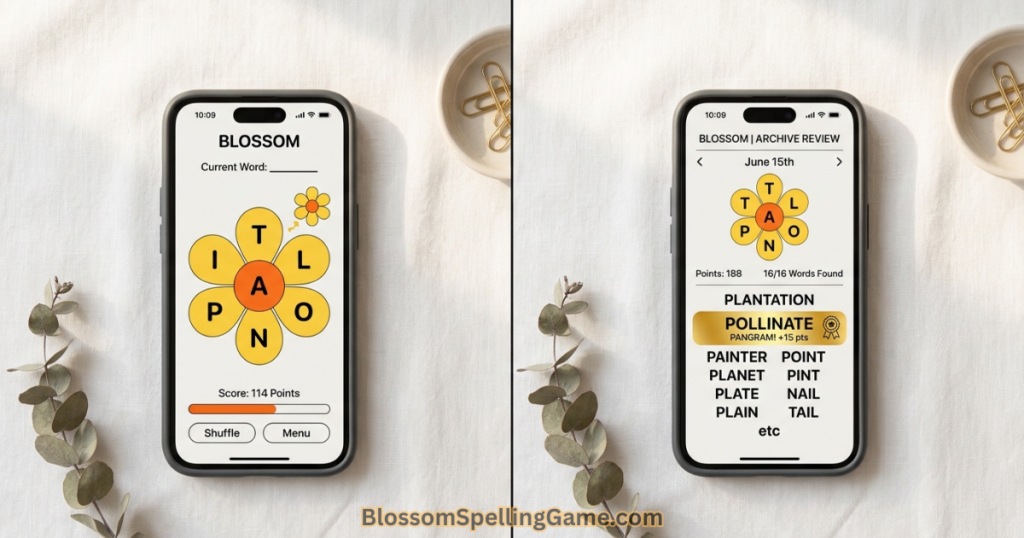
The letter set. The center letter and all six petal letters from that day’s puzzle. This is the core data — it lets you understand the structural character of past puzzles and look for patterns.
All valid words. The complete list of accepted words for that day’s letter combination, typically sorted by length. This includes words you would never have found in active play — obscure but valid Merriam-Webster entries that appeared in that letter set.
The pangram(s). Clearly marked, usually highlighted or labeled separately. Seeing the pangram in context — after knowing the full letter set and word list — is one of the most educational archive experiences because you can trace backward to understand why it exists in that letter set.
Score breakdown. The maximum possible score for that puzzle, based on the full valid word list with optimal bonus petal letter sequencing.
What’s typically not included:
Your personal session data (unless you played with an account and the platform stores individual session history). Most archives show the objective puzzle data — what was possible — not what you specifically did.
A live play interface. Archive views generally present information in browse format. Submitting words and receiving feedback in real time is a feature of the live daily puzzle, not the archive review.
Complete multi-month history on every platform. Archive depth varies significantly by platform — some go back weeks, some go back months, some have limited or no past-puzzle data.
Where to Find the Blossom Archive
Multiple platforms maintain past Blossom puzzle data. Here’s the practical breakdown:
BlossomSpellingGame.com — Primary Recommendation
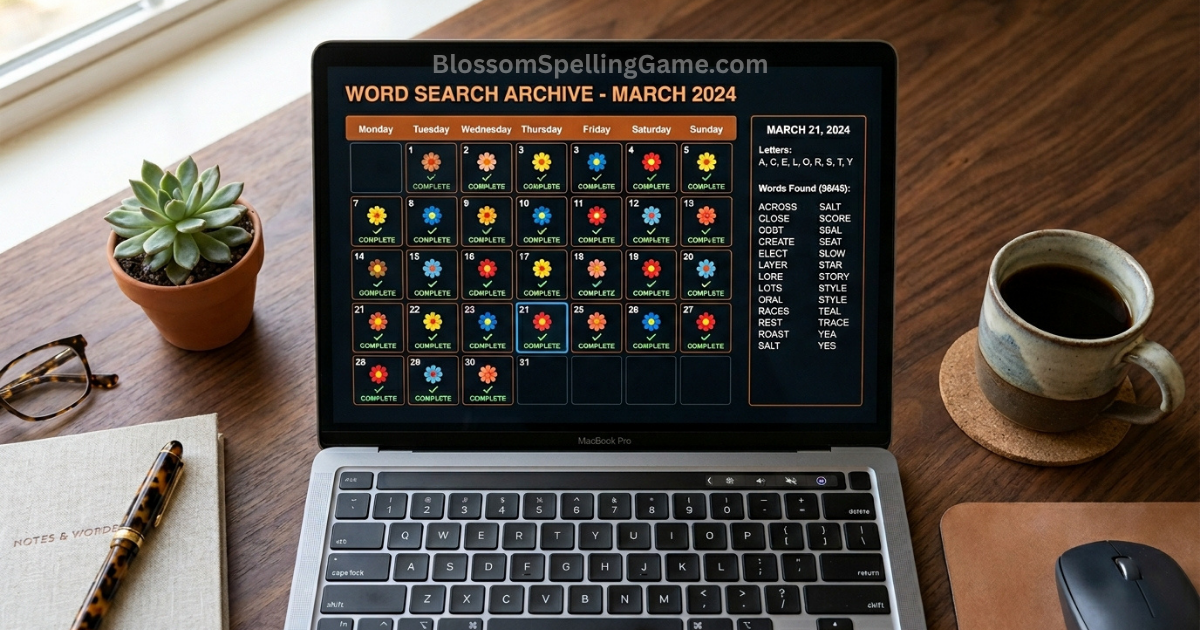
The most player-friendly archive experience. BlossomSpellingGame.com provides access to past puzzles through its “View Full Month Result” feature. From the main game interface:
- Complete today’s puzzle (or open the site on any day)
- Look for the “View Full Month Result” button — typically found in the score summary or stats section
- This opens a calendar-style view of the current month’s puzzles
- Click any past day to see that puzzle’s letter set, valid words, and pangram
The archive on BlossomSpellingGame.com goes back multiple months, providing a substantial vocabulary review resource. The format is browse/review — you see the complete information rather than playing the puzzle live in a time-locked format.
word.tips/blossom-word-finder
Also maintains a past puzzle archive with word lists and pangrams for recent puzzles. Useful as a secondary reference, particularly for cross-checking specific words.
WordUnscrambler.net
Has archived past puzzle data going back multiple months — one of the more comprehensive archives for players who want extensive historical data.
The Merriam-Webster Blossom interface
The standard Merriam-Webster version shows the previous day’s answers after the daily reset (similar to how the NYT Spelling Bee reveals what you missed). This is a single-day lookback rather than a full archive.
The Blossom mobile app
Some app versions maintain a local record of puzzles you’ve played (showing your session history). Whether the app provides access to past puzzles you didn’t play varies by version — check your app’s stats or history section.
How Far Back Does the Archive Go?
This question matters if you’re planning to use the archive for systematic vocabulary study — knowing the resource’s depth determines what kind of practice is possible.
BlossomSpellingGame.com: Maintains archives going back multiple months, updated regularly as new daily puzzles appear. The “View Full Month Result” calendar allows month-by-month navigation. For most players’ purposes, several months of past puzzles is more than sufficient.
word.tips: Archive depth varies — typically maintains recent weeks to a few months. More reliably current than historically deep.
WordUnscrambler.net: One of the more historically complete archives, with data going back substantially further than most platforms.
Third-party answer sites: Various word game answer sites archive Blossom solutions as they publish daily hints. These range from highly current (same-day updates) to historical compilations. Quality and completeness vary significantly.
Practical consideration: For most training purposes, the most useful archive is recent rather than historical. Puzzles from the last 30–60 days are most relevant because they reflect the current range of letter set configurations and vocabulary scope. Going back years (if such archives exist) is more interesting for data analysis than for practical vocabulary training.
How to Navigate the BlossomSpellingGame.com Archive
Here’s the step-by-step navigation guide for the BlossomSpellingGame.com archive:
Accessing the archive:
- Open BlossomSpellingGame.com in your browser
- Play or open today’s puzzle
- Look for the “View Full Month Result” button in the stats or score summary area — it appears after completing a puzzle or in the stats panel
- The button opens a monthly calendar view
Reading the monthly calendar:
- Each day in the calendar shows a marker indicating whether a puzzle was played that day (if you have an account and session tracking)
- Click any completed day to view that day’s puzzle data
- Days that are in the future are naturally locked; past days are accessible
Viewing a specific past puzzle: Once you select a past day, the archive view shows:
- The seven letters (center + six petals) from that day
- The complete word list, typically sorted by length and/or score
- The pangram highlighted or labeled distinctly
- The maximum possible score for that puzzle configuration
Month navigation: Use the calendar controls to move between months. This lets you browse back through previous months’ puzzles systematically.
With vs. without an account: With a BlossomSpellingGame.com account, the archive may also show your personal session data for puzzles you played — what words you found, your score, how it compared to the maximum. Without an account, you see the objective puzzle data but not personal session history.
Interactive Play vs. Answer Review — The Key Difference
This distinction determines how you use the archive and what you can realistically expect from it.
Interactive play (live puzzle experience): You see the letters, submit words in real time, receive accept/reject feedback, accumulate score, and experience the puzzle as it was intended — with the uncertainty of not knowing which words are valid until you test them.
This is only available for the current day’s live puzzle. Once a puzzle has reset, the live interactive experience is gone.
Answer review (archive experience): You see the complete solution — all valid words, the pangram, the full word list. You know the answers before you start. This changes the cognitive experience fundamentally: you’re studying a solved puzzle rather than solving an unsolved one.
Can you simulate interactive play with archive data?
Yes — with deliberate effort. Here’s how serious players use archive data for active practice rather than passive review:
- Note the letter set from an archive entry (center letter + six petals)
- Close the archive view before looking at the word list
- Open a blank text document or notes app
- Set a 15-minute timer and try to find as many words as you can from that letter set
- Check your results against the archive word list when your timer ends
This self-directed simulation recreates the live puzzle experience using archived letter sets. It’s not identical to the real puzzle (you have unlimited time and no slot budget pressure in this simulation) but it’s a meaningful vocabulary workout.
The “known answer” bias: One limitation of even the best simulated archive practice is that once you’ve seen a puzzle’s solution — even briefly — the pangram and unusual words are partially pre-loaded in your memory. The most authentic archive practice uses puzzles you haven’t previously seen in either play or review. This argues for using archive puzzles you definitively missed (days you didn’t play) for simulation practice, and using puzzles you did play for post-session review.
The Missed Day Use Case — What to Do When You Miss a Puzzle
Missing a day is one of the most common reasons players look for the archive. Here’s exactly what to do and what to expect.
Immediately after missing:
Once midnight ET passes without you having played that day’s puzzle, the live puzzle for that day is gone from the standard interface. You can’t go back to complete it — the game has moved to the next day’s letter set.
What you can do immediately: check BlossomSpellingGame.com’s archive (or word.tips) for the previous day’s puzzle data. The archive typically updates to include the just-expired puzzle’s data within hours of the reset — sometimes immediately.
What you can get from the missed day archive:
- The letter set (center letter + six petals)
- All valid words for that combination
- The pangram
- What score was achievable
What you can’t get:
- The live interactive experience of solving it unspoiled
- Streak credit (viewing the archive doesn’t restore a broken streak — see the streak section below)
- The specific satisfaction of finding the pangram without knowing it in advance
The practical missed-day approach:
For players who primarily care about vocabulary learning rather than competitive performance, a missed day in the live puzzle is actually an opportunity in archive review. You get the complete word list without the frustration of a partial session. Read through the words you wouldn’t have found, look up the unfamiliar ones, and consider the letter set’s structure at your own pace.
For players who primarily care about streaks and performance — the missed day is simply a reset. The archive review is useful for vocabulary, but it doesn’t change the streak reality. See our Blossom Streak Guide for the full guidance on rebuilding after a missed day.
The Training Use Case — Using the Archive to Improve
This is the highest-value use of the archive — and the one most players underutilize. Archive puzzles aren’t just compensation for missed days; they’re a vocabulary training resource.
Method 1: Post-session review (the most important habit)
After every live session, compare your word list to the archive’s complete word list for that day. This review is most valuable when done the next day (after the archive has been published) or during the current session if you’re using a finder tool alongside play.
Ask yourself three questions about every word you missed:
- Did I know this word existed? (Vocabulary gap)
- Did I know the word but fail to retrieve it? (Retrieval gap)
- Did I know the word but didn’t check if the letters were available? (Search methodology gap)
These three categories point to different types of practice. Vocabulary gaps require learning new words. Retrieval gaps require more vocabulary activation practice (Blossom itself, but with more deliberate engagement). Search methodology gaps require reviewing your search technique — the suffix guide, prefix guide, and pangram guide are the relevant resources.
Method 2: Personal word bank building
Keep a running note — in a phone notes app, a physical notebook, anywhere — of interesting words that appear in archive reviews. Focus on:
- Words you recognized but couldn’t have produced (passive vocabulary you want to activate)
- Words you didn’t know and looked up after seeing them in the archive
- Unusual word forms (inflections, comparatives, past tenses) that the game accepts
Reviewing this personal word bank periodically builds the specific vocabulary dimensions that Blossom exercises. Over four to six weeks of systematic archive review, this word bank typically produces measurable score improvements.
Method 3: Controlled simulation practice
As described in the interactive vs. review section: use letter sets from archive puzzles you missed to create simulation practice sessions. The constraint of a specific letter set — rather than hypothetical practice — produces the vocabulary retrieval demands closest to live play.
Reverse-Engineering Pangrams From the Archive
This specific archive use case deserves its own section because it’s one of the highest-leverage training activities available.
The goal: look at a past puzzle’s letter set, already knowing what the pangram is, and work backward to understand exactly why the pangram exists in that letter set.
The reverse-engineering process:
- Open an archive entry for a past puzzle
- Note the letter set (center + six petals) WITHOUT immediately looking at the word list
- Spend 3–5 minutes trying to find the pangram independently
- Then look at the revealed pangram
- Ask: what search path would have led me to this word?
This isn’t about finding the pangram “for real” — you can always just look at the answer. The value is in the gap between “the path I took” and “the path that would have worked.” That gap reveals your specific search methodology weaknesses.
What the reverse-engineering teaches:
If you consistently miss pangrams that are common compound words (STARLIGHT, OVERCOME, HANDCRAFT), your search methodology is weak on compound word detection. If you consistently miss pangrams that use unusual -TION or -NESS extensions, your suffix search is stopping too early.
Across 15–20 archive puzzles, a clear pattern will emerge in the specific types of pangrams you’d have missed — and that pattern is a precise diagnosis of your vocabulary search methodology gaps. For the full pangram-finding methodology to apply against these gaps, see our Pangram Guide.
A note on sample size:
Three or four archive reverse-engineering sessions aren’t enough to establish reliable patterns. Aim for at least ten before drawing conclusions about your specific weaknesses. Pangram types vary enough day to day that small samples produce misleading patterns.
Tracking Your Vocabulary Growth Through the Archive
One of the most motivating things the archive enables is a longitudinal view of your own improvement — comparing how you perform on puzzles now versus how you’d have performed on those same puzzles weeks ago.
The progress comparison method:
- Take a letter set from an archive entry from 30 days ago
- Without looking at the word list, write down every word you can find in 15 minutes (simulation session)
- Compare your results to the archive’s complete word list
- Note how many words you found, your estimated score, and whether you found the pangram
Then do the same with a letter set from 60 days ago. And from 90 days ago.
If you’ve been playing daily and applying deliberate strategy, the trajectory should be visible: more words found, higher estimated score, more consistent pangram discovery, as the letter sets get further back in time. (Earlier archives = letter sets from when you were a newer player.)
Why this works psychologically:
Vocabulary skill development in Blossom is gradual enough that day-to-day improvement is nearly invisible. You don’t feel noticeably better on Tuesday than you did on Monday. But the difference between your performance today and your performance from three months ago is often substantial — and seeing that difference concretely, against actual puzzle data, is one of the most motivating experiences available to serious Blossom players.
Letter Pattern Analysis Across Past Puzzles
For data-oriented players, the archive opens an interesting analytical dimension: studying the structural properties of past letter sets to understand the puzzle’s construction patterns.
Questions the archive can answer:
Which center letters appear most frequently? If you track center letters across a few months of archive data, you’ll see which letters Blossom uses most as center letters. This tells you which letter types you should develop the deepest vocabulary for.
What’s the average vowel count per puzzle? Vowel count significantly affects puzzle difficulty. Tracking this across the archive helps you understand whether a current puzzle’s vowel balance is unusual or typical.
How often do compound word pangrams appear? If you can identify the pangram type (compound word, -TION extension, -NESS extension, etc.) across a sample of archive puzzles, you get a frequency distribution that tells you which pangram types to prioritize in your search methodology.
Do letter sets repeat? Exact repeat letter sets (same seven letters in the same configuration) are rare in a well-designed daily puzzle. But approximate repeats — sets sharing five or six letters — may appear occasionally. Players who have encountered similar letter sets previously have an intuitive advantage.
The practical investment: Letter pattern analysis requires more time than most casual players will invest. But for serious players interested in maximizing their systematic approach, even a few hours of archive analysis can produce lasting strategic insights. A simple spreadsheet tracking letter sets, center letters, and pangram types across the past 60 days is a meaningful investment for dedicated players.
Does Playing Archive Puzzles Restore a Broken Streak?
This is one of the most common questions about archive access — and the answer is important to understand clearly.
No — accessing or playing archive puzzles does not restore a broken streak.
The streak mechanic counts consecutive live daily puzzle sessions. Archive puzzles, regardless of how many you view or simulate, don’t retroactively fill a missed day in your streak counter. The streak is based on real-time participation in the daily puzzle cycle, not on archive engagement.
What this means practically:
If you missed yesterday’s puzzle and went to the archive hoping to “catch up” and restore your streak — that’s not how the system works. You can review yesterday’s puzzle in the archive (which has real vocabulary learning value), but your streak still shows the missed day as a gap.
The right frame for archive use:
Think of archive puzzles as a study tool, not a streak rescue tool. They’re valuable for vocabulary training, post-session review, and pangram practice — not for addressing streak mechanics.
For streak restoration approaches that do work (deliberate account setup, reminder systems, the minimum valid word safety play), see our Blossom Streak Guide.
Archive Access Across Different Platforms
| Platform | Archive Available? | How Far Back | Interactive Play | Notes |
|---|---|---|---|---|
| BlossomSpellingGame.com | Yes | Multiple months | Browse/review | “View Full Month Result” feature; account improves experience |
| BlossomSpellingGame.com (with account) | Yes + personal history | Multiple months | Browse/review | Personal session data also accessible |
| Blossom mobile app | Varies by version | Limited | Session history only | Check app’s stats/history section |
| Merriam-Webster Blossom | Previous day only | 1 day | Browse/review | Shows missed words from yesterday |
| word.tips/blossom-word-finder | Yes | Weeks to months | Browse/review | Good secondary reference |
| WordUnscrambler.net | Yes | Months (extensive) | Browse/review | One of the deeper archives |
| Third-party answer sites | Varies | Varies | None | Quality varies significantly |
For most players, BlossomSpellingGame.com is the recommended archive resource — it’s free, no account required for basic access (account improves the experience), the interface is clean and specifically designed for Blossom, and the archive depth is sufficient for all practical training purposes.
FAQ
Can you play old Blossom Word Game puzzles?
You can access past puzzle data — letter sets, complete word lists, and pangrams — through archives on platforms like BlossomSpellingGame.com (via “View Full Month Result”), word.tips, and WordUnscrambler.net. Full interactive play (submitting words live and receiving feedback in real time) is only available for the current day’s puzzle. Archive access is primarily browse/review format.
How do I access old Blossom puzzles on BlossomSpellingGame.com?
After completing (or opening) today’s puzzle, look for the “View Full Month Result” button in the score summary or stats panel. This opens a monthly calendar view where you can click any past date to see that day’s letter set, valid words, and pangram.
How far back does the Blossom archive go?
BlossomSpellingGame.com maintains an archive going back multiple months. WordUnscrambler.net has one of the most extensive historical archives. Depth varies by platform — check your preferred platform’s archive section for its specific range.
Can I restore my streak by playing archive puzzles?
No. The streak counts consecutive live daily puzzle sessions. Reviewing or simulating archive puzzles doesn’t retroactively fill missed days in your streak counter. Archive access is a study tool, not a streak restoration mechanism.
What can I learn from reviewing past Blossom puzzles?
Post-session archive review is one of the most effective vocabulary training activities available. Compare your word list to the complete archive word list to identify vocabulary gaps, retrieval gaps, and search methodology gaps. Words you consistently miss point to specific areas for improvement. Reverse-engineering pangrams from archive puzzles builds systematic search methodology skills.
Are there archive puzzles I can play as if they were fresh?
You can simulate fresh play by noting the letter set from an archive entry, not looking at the word list, and then trying to find words from that letter set in a self-timed session. The limitation is that once you’ve seen a puzzle’s answer — even briefly — the words are partially pre-loaded in memory. The most authentic simulation practice uses puzzles from days you definitively missed.
Does the Blossom app have an archive?
App versions vary in archive depth. Most apps record your own session history (what you played and scored). Whether they provide access to puzzles you didn’t play — with the complete word list — depends on the specific app version. Check your app’s stats or history section to see what’s available.
Can I see what words I missed in yesterday’s Blossom puzzle?
Yes — through BlossomSpellingGame.com’s archive (available after the puzzle resets) and the Merriam-Webster version (which shows previous day’s answers after reset). Both give you the complete word list for the previous day’s puzzle, making it easy to identify exactly what you missed.
Is there a way to practice Blossom without waiting for daily resets?
Archive puzzles provide unlimited practice material using real past letter sets. Use the simulation method: note an archive letter set, close the word list, and practice finding words from that set in a self-timed session. Platforms like Wordle Unlimited offer unlimited play for Wordle-style games; Blossom’s format is more specifically daily, but archive-based simulation fills the same practice need.
Why is reviewing archive puzzles valuable if I can just look at the answers?
The learning value isn’t in seeing the answers — it’s in the gap analysis between what you found in your live session and what was possible. That gap diagnoses specific vocabulary and strategy weaknesses. Without archive data, you only know how many words you found; with archive data, you know which types of words you consistently miss and why.
Final Thoughts
The archive isn’t just compensation for missed days. It’s one of the most underused features in Blossom’s ecosystem — and for players who engage with it systematically, it’s a vocabulary training resource that accelerates improvement faster than live play alone.
The gap between what you found today and what was possible is the clearest signal you have about where your vocabulary and strategy can improve. The archive makes that gap visible. The post-session review habit — ten minutes after each puzzle, comparing your word list to the archive — is the single most effective study practice available to a serious Blossom player.
Start tonight. After you finish today’s puzzle, check back tomorrow and look at the archive for today’s date. See the words you missed. Identify which ones you knew but didn’t retrieve, which ones were genuinely new vocabulary, and which ones were there in the letter set but your search methodology missed them.
That ten-minute review will do more for your next session than any amount of general strategy reading.
Play today’s puzzle at BlossomSpellingGame.com — free, no download, with archive access built in. Your seven letters are waiting, and yesterday’s answers are already there whenever you want to compare.