
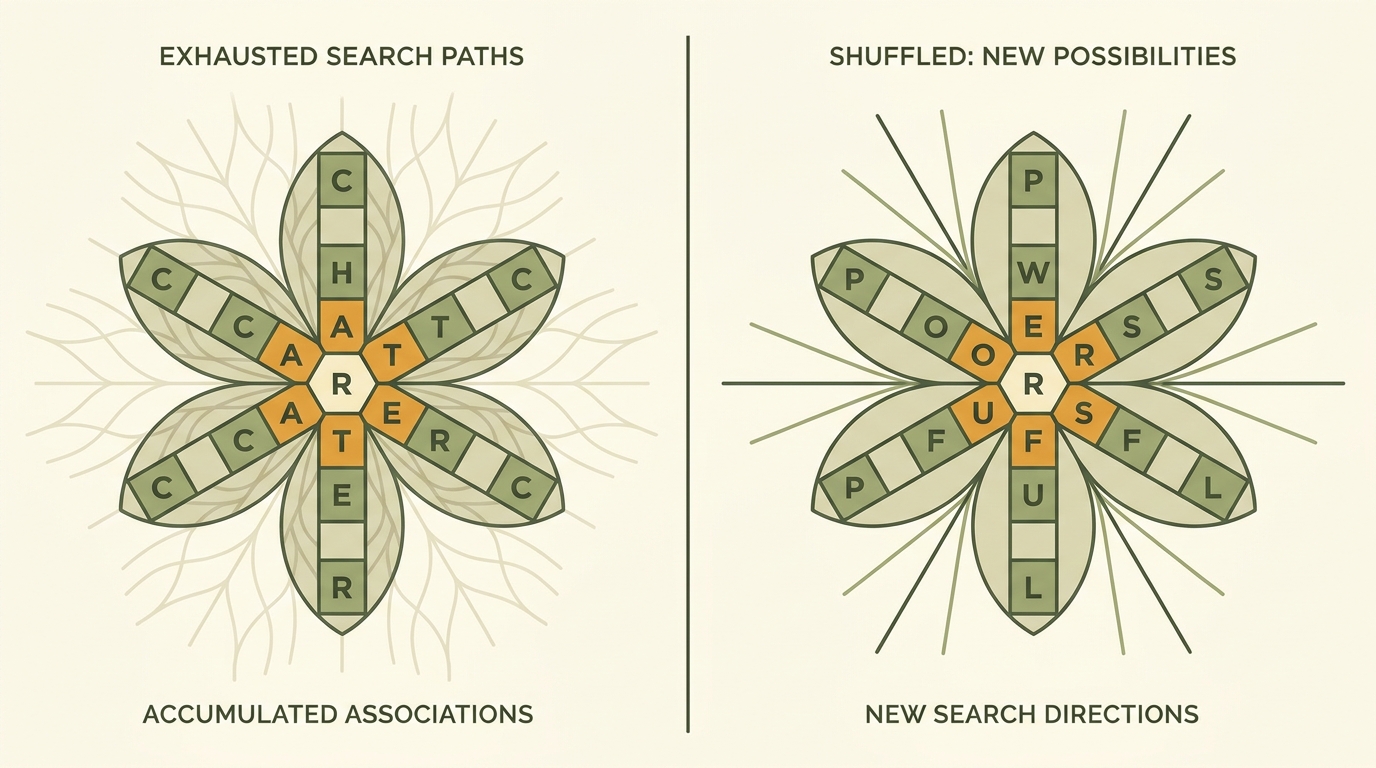
The shuffle button in Blossom Word Game is more powerful than most players realize. Here’s the cognitive science behind it and exactly when and how to use it.
The shuffle button is the most underused feature in Blossom Word Game. Not because players don’t know it exists — most do — but because they use it too late, too randomly, or without changing anything else about their search strategy afterward. A shuffle that isn’t accompanied by a genuinely fresh approach to the letters produces the same results as no shuffle at all.
Done correctly, shuffling is one of the fastest ways to break through a stalled session and surface words you would have missed entirely. There’s real cognitive science behind why it works — and understanding that science tells you not just when to shuffle, but how to search differently afterward to actually capture the benefit.
This guide covers everything: why spatial rearrangement breaks pattern fixation, the optimal timing and frequency for shuffling, what to do differently after each shuffle, and the common mistakes that make shuffling feel useless even when it could genuinely help.
What the Shuffle Button Actually Does
The shuffle button rearranges the six outer petal letters into a new spatial configuration without changing which letters are available or any other aspect of the puzzle. The center letter stays fixed. Every letter that was available before is still available after. No rules change. Nothing about what words are valid changes.
The only thing that changes is where each letter sits in the flower grid’s visual layout.
That sounds trivially small. The cognitive impact is surprisingly large — for reasons that have to do with how visual word recognition actually works in the brain, covered in the next section.
What shuffle does NOT do:
- Change the center letter
- Add or remove available letters
- Change which words are valid
- Reset your submitted words or score
- Give you any hints about words you haven’t found
It’s a purely visual rearrangement tool. Its entire value comes from what that rearrangement does to your cognitive state — not to the puzzle itself.
The Cognitive Science: Why Spatial Rearrangement Works
This is the part most guides skip, and it’s where the real insight lives.
Your brain’s word recognition system doesn’t process letters as purely abstract symbols — it processes them in spatial context. When you look at the Blossom flower grid, you’re not just seeing seven independent letters; you’re seeing seven letters in specific positions relative to each other. Your visual cortex encodes not just “which letters” but “which letter is next to which other letter” — the spatial relationships between them.
This spatial encoding creates what cognitive scientists call configuration-specific associations — your brain builds connections between specific spatial arrangements of letters and the words you’ve found or attempted from those arrangements. After you’ve stared at the same petal configuration for several minutes, the letters in those positions have accumulated strong associations with words you’ve already tried, found, and failed to find.
The problem: These accumulated spatial associations make it progressively harder to see new words in the familiar arrangement. Your visual system keeps “returning” to the letters in their established positions, triggering the same associations it’s already exhausted. The word you haven’t found isn’t invisible — it’s actively suppressed by the stronger associations built up around the positions you’ve already searched.
The shuffle solution: Rearranging the spatial positions of the letters breaks the accumulated configuration-specific associations. The letter that was in the upper-left is now in the lower-right. Its established neighbors have changed. The spatial context your brain has built up for this session no longer applies.
This forces a genuine visual reset — your brain must build new spatial associations from scratch, which creates real openings for words that the previous configuration was actively suppressing. This isn’t a placebo effect or wishful thinking — it reflects how visual word recognition is actually organized in the brain.
The Pattern Fixation Problem It Solves
There’s a specific cognitive phenomenon at play when you’re stuck in Blossom: functional fixedness applied to visual-spatial letter scanning. You’ve mentally “fixed” the letters into a configuration — not just spatially, but in terms of which combinations you consider viable.
After two minutes of searching without finding a new word, most players have unconsciously narrowed their considered combination space to a subset of possibilities based on the spatial relationships they’ve been scanning. The letter in position 3 “goes with” the letter in position 5, because that’s been a productive pairing in the current session. The letter in position 1 “doesn’t connect” to position 6, because attempts along that axis haven’t worked.
These mental models become self-reinforcing: you stop generating new candidates from configurations your brain has categorized as unproductive, even when those configurations haven’t actually been exhaustively tested.
Shuffling breaks this fixation by making the categorizations spatially inapplicable. The letter that “didn’t connect” with its former neighbor is now next to a different letter. The combination space your brain was excluding based on position is no longer excluded — it simply doesn’t exist in the same form.
The practical result: Players consistently report finding words within one to two minutes of shuffling that they couldn’t see during extended pre-shuffle searching. This isn’t because the word became easier — it’s because the shuffle removed the cognitive barrier that was preventing them from generating the candidate in the first place.
When to Shuffle — A Practical Timing Framework
Most players shuffle too late — only after extended stalling, when frustration has built up and the session is running low on both motivation and slot budget. Here’s a more effective timing framework:
First shuffle: Earlier than you think necessary
Don’t wait until you’re genuinely stuck to shuffle for the first time. Consider a preemptive first shuffle after finding your initial cluster of obvious words — typically after slots 3-5 are filled. This rearrangement while you still have energy and slots available changes your visual context before pattern fixation has fully set in, rather than after.
Subsequent shuffles: Every 90 seconds of no new word found
Once you’re actively searching without results, use the 90-second rule from our Advanced Strategies guide: if 90 seconds of active searching produces no new word, it’s time to shuffle. Don’t wait for 5 minutes of frustration — shuffle proactively at the first sign of stalling.
Pangram-specific shuffle: Before giving up on the pangram
Before conceding that you can’t find the pangram in this session, do a dedicated shuffle specifically aimed at the pangram search. The pangram hunt specifically benefits from spatial reset because pangram candidates are often longer words spanning more letters — which means configuration-specific fixation is especially likely to be suppressing them.
Final-slot shuffle: When you need one more word
When you’re at slot 11 or 12 and need one more word to complete the puzzle, shuffle before making your final attempts rather than after. A fresh visual context for your last search attempt is more productive than a frustrated, fixated final scan of a familiar arrangement.
How Many Times Is Too Many?
This is a legitimate question — does shuffling lose its effectiveness after too many uses?
The diminishing returns reality: Each successive shuffle provides a marginally smaller benefit than the previous one, because with each rearrangement you’ve already broken the most entrenched configuration-specific associations from the original layout. By the fourth or fifth shuffle in a session, you’re unlikely to be creating dramatically new visual contexts — you’ve already disrupted the major fixation patterns.
The practical limit: Most players find meaningful benefit from 3-5 shuffles per session. Beyond that, additional shuffling tends to produce diminishing returns and can become a substitute for more productive reset strategies (vocalization, physical break, changing your search methodology).
The exception: If you shuffle and immediately search productively (finding a new word within 60 seconds), the shuffle has done its job. Reset your “shuffle counter” mentally — that was a productive use. Only count shuffles where you searched afterward without finding anything.
The guideline: Use shuffle freely in the first two-thirds of your session. In the final third (slots 9-12), combine shuffle with other reset techniques rather than relying on shuffle alone.
What to Do Differently After Each Shuffle
This is the most commonly skipped step — and the reason many players find shuffling “doesn’t work” for them.
The anti-value shuffle: You shuffle. You look at the same letters, now in new positions. You immediately try the same candidate words you’ve been trying for the past three minutes. Nothing new appears. You conclude shuffling doesn’t help.
The reason this fails: You’ve changed the visual arrangement but not your search strategy. The spatial reset only helps if you actually use the new spatial relationships to generate new candidates — which means searching differently after shuffling, not just looking at different positions for the same words.
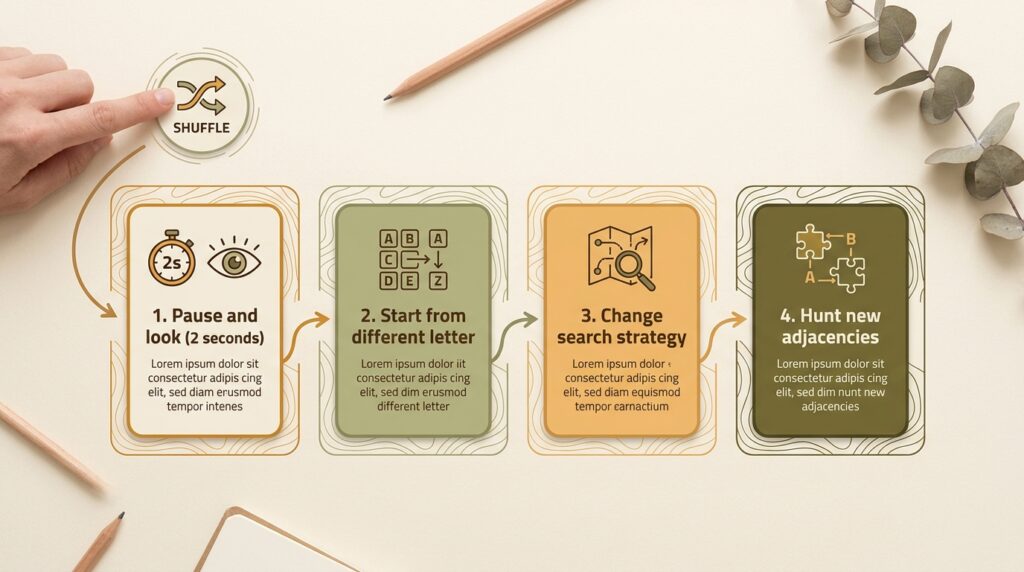
What to do after each shuffle:
- Take two seconds to actually look at the new arrangement before generating any candidates. Let your visual system register the new spatial relationships without immediately jumping into word generation. This brief pause allows the old configuration’s associations to fade before the new ones begin forming.
- Start from a different letter than you started from last time. If you’ve been anchoring your search on the center letter and radiating outward, try starting from an outer petal this time. If you’ve been starting from the left side, scan from the right.
- Try a different search strategy. If you were hunting suffix extensions before shuffling, try category sweeps after. If you were scanning for consonant clusters, try thinking of semantic categories (nature words, action words) instead.
- Specifically look for adjacencies you haven’t used. Identify two letters that are now next to each other in the new arrangement that weren’t neighbors in the previous arrangement, and specifically hunt words that contain both of them.
The shuffle creates the opportunity. Your changed search behavior after the shuffle is what actually captures it.
The Anti-Shuffle Mistake
The single most common shuffle error is worth naming explicitly: using the shuffle button as a comfort action rather than a strategic reset.
What this looks like: You feel stuck. You press shuffle. You look at the new arrangement for about three seconds. You start searching in approximately the same way as before the shuffle. Three minutes later, still stuck, you press shuffle again. Repeat.
This pattern provides the psychological comfort of “doing something” without actually changing the cognitive conditions that caused the stall. The letters have been moved, but your search strategy hasn’t changed, your starting letter hasn’t changed, and the word families you’re generating candidates from haven’t changed.
The tell: If you’ve shuffled three or more times in quick succession without finding a new word, you’re likely in anti-shuffle mode. Stop shuffling and instead try a fundamentally different approach: vocalize letters aloud, switch from visual scanning to semantic category thinking, or take a brief physical break.
The rule: Never shuffle without explicitly deciding in advance what you’ll do differently in the next 60 seconds of searching. The shuffle should be a strategy shift, not just a visual refresh.
Combining Shuffle With Other Reset Techniques
For maximum effectiveness when genuinely stuck, combine the shuffle with complementary reset techniques rather than relying on shuffle alone.
Shuffle + vocalization: After shuffling, read the letters aloud in their new arrangement rather than scanning them visually. Your auditory vocabulary processing accesses different word associations than your visual processing — spoken vocabulary and visual-scanning vocabulary are partially independent systems. Vocalizing after shuffling combines two different kinds of cognitive reset simultaneously.
Shuffle + physical break: Take the shuffle as the last action before stepping away from the puzzle for 2-3 minutes (get water, stretch, briefly do something else). Return to the shuffled arrangement with genuinely fresh eyes — not just a spatial reset, but a full attentional reset. This is the most powerful combination for breaking deep fixation.
Shuffle + category shift: After shuffling, spend 60 seconds specifically generating words from a single semantic category you haven’t focused on yet (food words, nature words, movement words, emotion words). The category constraint forces your brain to generate candidates from a different vocabulary territory than the open-ended scanning you’ve been doing.
Shuffle + starting-point shift: After shuffling, spend 30 seconds looking only at pairs of adjacent letters in the new arrangement, asking “what word could these two letters start?” rather than scanning all seven. This local, pair-focused approach often surfaces short words that can be extended into longer ones you’ve been missing.
Why Some Players Never Use It (And What They’re Missing)
In conversations among consistent Blossom players, a small but vocal group explicitly avoids the shuffle button — usually on principle: “I want to solve it with the letters as given” or “using shuffle feels like cheating.”
The design intention: The shuffle button is an official, deliberate feature of the game, placed prominently in the interface. The game’s designers included it specifically as a tool players are intended to use. There’s no more “cheating” involved in using the shuffle button than in using the hint feature that Blossom also officially provides.
What non-shufflers are missing: On average, players who use the shuffle button find 1-2 more words per session than players who don’t, holding vocabulary level constant. This isn’t just a speculation — it follows directly from the cognitive mechanism: pattern fixation is real and measurable, and spatial rearrangement reliably disrupts it. The words non-shufflers are missing aren’t harder words — they’re words of the same difficulty that are being cognitively suppressed by the familiar configuration.
The philosophical compromise: If you prefer the “pure” experience of solving the letters as originally arranged for most of the session, consider using shuffle only once, specifically for the pangram hunt, as a deliberate single cognitive reset rather than a repeated tool. This captures most of the benefit while preserving the experience of primarily solving the original arrangement.
FAQ
What does the shuffle button do in Blossom Word Game?
The shuffle button rearranges the six outer petal letters into a new spatial configuration without changing which letters are available or any other aspect of the puzzle. The center letter stays fixed. Nothing about valid words changes — only the visual positions of the outer letters shift.
Does shuffling help find more words in Blossom?
Yes, significantly. The cognitive mechanism is real: your brain builds configuration-specific associations during searching that progressively suppress new word candidates. Spatial rearrangement breaks these associations and genuinely opens new word-finding pathways. Players who use shuffle effectively find more words on average than those who don’t.
When should I use the shuffle button in Blossom?
Use it proactively — not only when stuck but also after filling your first 3-5 slots to break early configuration bias, every ~90 seconds of unsuccessful searching, before giving up on the pangram, and before your final slot attempt. Earlier and more frequent shuffling is more effective than waiting until deep frustration sets in.
How many times should I shuffle in a Blossom session?
3-5 shuffles per session is a reasonable range where benefits are consistent. Beyond that, diminishing returns set in. More importantly: only count shuffles where you genuinely searched afterward without finding a word — productive shuffles that immediately help you find something don’t count toward the diminishing-returns limit.
Why does shuffling sometimes not seem to help?
Usually because the search strategy didn’t change after shuffling. The spatial reset only works if you actually use the new spatial relationships to generate new candidates. If you shuffle and then search in exactly the same way as before, the cognitive benefit of the rearrangement is wasted. Always change something about your approach after each shuffle.
Is using the shuffle button cheating in Blossom?
No — it’s an official, intentionally designed game feature. The developers included it specifically as a tool for players to use. Using it is no different from using the hint feature or any other built-in game mechanic.
Final Thoughts
The shuffle button is a cognitive tool, not just a visual one. Understanding why it works — spatial association breaking, pattern fixation disruption, configuration-specific word recognition — changes how you use it: earlier, more deliberately, and always followed by a genuinely different search approach.
The players who benefit most from the shuffle button aren’t the ones who press it most often. They’re the ones who press it with intention and immediately do something different afterward. That combination — spatial reset plus strategy shift — is what turns a stuck session into a productive one.
Play today’s puzzle at BlossomSpellingGame.com. When you first feel the search starting to stall — not when you’ve been stuck for five minutes, but at the first sign of slowing — press shuffle, take two seconds to see the new arrangement, and start from a different letter than you started from last time.