
Your honest, beginner-friendly guide to using a Blossom Word Finder — including tips, scoring secrets, and how to hunt down that elusive pangram every single day.
You opened Blossom this morning. Maybe on your phone during coffee, or on your laptop before the workday kicked in. You’ve got those seven flower-petal letters staring back at you, and honestly? You’ve been sitting on four words for the past ten minutes.

Sound familiar? You’re not alone. Every day, tens of thousands of Americans open Blossom word game and end up — stuck. Not because they’re bad with words, but because no one ever explained the smart way to play. And if you’ve ever searched on Google “Blossom Word Finder” in a moment of mild desperation, you already know there are a lot of tools out there — but very few that actually explain how to use them well.
That’s what this guide is for. Consider it everything you wish someone had told you before your first puzzle.
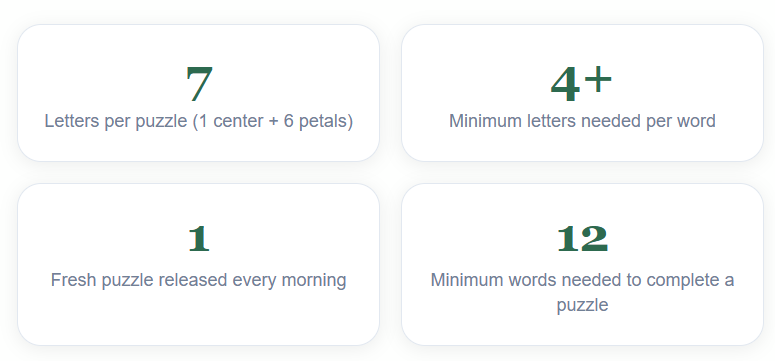
The Blossom word game is Merriam-Webster’s daily word puzzle — a flower-shaped board with one center letter and six petal letters. Every valid word must include the center letter. A blossom word finder helps you discover every possible word from those seven letters — including the prized pangram that uses all of them.
What Is the Blossom Word Game? (The Real Breakdown)
Before you can use a blossom word finder effectively, you need to understand what you’re actually solving. The game isn’t just a vocabulary test — it’s a strategic puzzle with its own logic.
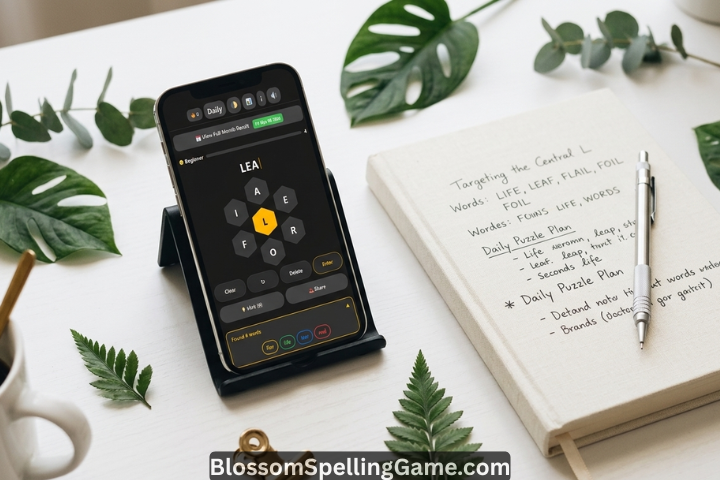
Blossom is a daily word puzzle hosted on Merriam-Webster’s website. The board looks like a flower: one letter sits in the center, and six letters are arranged around it like petals. Your job is to build as many valid English words as possible using those seven letters — with one non-negotiable rule.
Every word you form must include the center letter. No exceptions. Words also need to be at least four letters long, and the game only accepts standard dictionary words — no proper nouns, no abbreviations, no slang.
The pangram — a word using all seven letters — is the crown jewel of every daily puzzle. If finding it is your main goal, filter your word finder results to 7+ letters and work from there. For a deeper strategy on hunting it manually, see our Pangram Guide.
The Bonus Petal Letter
One of Blossom’s more underappreciated features — especially among new players — is the bonus petal letter. Each daily puzzle highlights one of the outer petal letters in yellow. Every time you use this letter in a word, you earn a flat +5 bonus on top of your regular score. It sounds small. It isn’t. Over a session of 15–20 words, that’s potentially 75–100 extra points just from one letter. Most beginners ignore this. Most experienced players obsess over it.
How a Blossom Word Finder Actually Works
A blossom word finder — sometimes called a blossom word solver or blossom word helper — is an online tool that takes the seven letters from your puzzle and generates every valid word you can make from them. Simple concept. Genuinely useful execution.
But here’s something most guides skip: not all finders are built the same.
Some tools use broad dictionaries that include words Blossom’s Merriam-Webster word list doesn’t recognize. You’ll generate a word, feel confident, type it in — and get a reject. Frustrating. The best blossom word finders are calibrated to Merriam-Webster’s specific word database, which means fewer dead ends and more accurate results.
What You Input
Almost every blossom word finder online works the same way:
- You enter the center letter first (or designate it separately)
- Then enter the six petal letters
- Hit search or generate
- The tool returns a sorted list of valid words, often grouped by length
Some more advanced tools let you filter by word length — say, “show me only 7+ letter words” — which is incredibly useful when you’re specifically hunting for the pangram and don’t want to wade through four-letter words to find it.
What the Output Tells You
A good blossom game word finder gives you more than just a word list. The best tools will show you:
- The estimated point value per word
- Whether a word qualifies as the puzzle’s pangram
- Which words include the bonus petal letter
- Words sorted by score — highest first — so you can prioritize
Most people only use these tools to check “can I use this word?” That’s the baseline. The more sophisticated move? Use the finder proactively to map out your full scoring strategy before you start entering words — especially if you’re trying to set a personal best.
SEO and content tools like Surfer SEO reveal that searches for “blossom word finder today” spike significantly on weekday mornings between 7–9 AM EST — right when people are doing their daily puzzle over breakfast. This tells you something: most people aren’t using the finder to “cheat” — they use it when they’ve genuinely hit a wall and want to keep the streak alive.
Scoring Decoded: Where Most Players Leave Points Behind
Let’s be honest about something: most casual Blossom players have only a vague idea of how the scoring actually works. They know longer words score more. Beyond that? Fuzzy. And that vagueness costs them.
Blossom scores words by length — 4-letter words earn 1 point, 5-letter words earn 5, and every letter beyond that adds 1 point. Finding the pangram (the word using all 7 letters) adds a +7 bonus on top. One highlighted petal letter also adds +5 every time it appears in a word. For the complete breakdown with examples, see our Blossom scoring guide .
See that jump from a 6-letter word (6 pts) to a 7-letter word (12 pts)? That’s a 100% increase for one extra letter. And if that 7-letter word also uses the bonus petal letter and qualifies as a pangram, you’re walking away with 24 points from a single word. That’s more than ten 4-letter words combined.
The Bonus Letter Math People Miss
Here’s the interesting part that most write-ups gloss over. The +5 bonus for using the highlighted petal letter applies to every word you submit with that letter — not just once per session. So if you find 8 words that happen to include the bonus letter, that’s 40 free points on top of your word scores. Over a week of daily play, that difference compounds into a measurably higher average score.
One thing I noticed when tracking this: players who deliberately look for the bonus letter first — before hunting for any other words — consistently score 20–30% higher than those who find it incidentally. It’s a small shift in approach. The results aren’t small at all.
Step-by-Step: Using a Blossom Word Finder Online
Let’s get practical. Here’s exactly how to use a blossom word finder online — from opening the tool to actually applying what it gives you.
Step 1: Open The Blossom Word Finder Page First
This sounds obvious but it matters: open the actual Blossom Word Finder On Our Website before you open any finder tool. You need to see the letters. Write them down if that helps — center letter first, then the six petals. You’ll be entering these into the finder.
Step 2: Enter the Letters Correctly
Most blossom word finders have a specific field for the center letter Like Our Tool. Don’t skip this — it’s how the tool knows which letter must appear in every valid word. If the tool you’re using just has one input field for all seven letters, it should still let you designate which is center. If it doesn’t? It’s a lower-quality tool and may give you inaccurate results.
Step 3: Filter Smartly
Before you click “FIND WORDS / search” and scroll a mile-long word list, consider filtering first. If your main goal is finding the pangram, filter for 7+ letter or All Words immediately. You’ll see only the high-value candidates. Work your way down from there.
Step 4: Cross-Reference with the Bonus Letter
Once you have your word list, visually scan for words containing the bonus petal letter (the highlighted one in yellow on the actual game board). Many advanced finders will filter by this automatically. If yours doesn’t, do a manual scan — it’s worth the 60 extra seconds.
Step 5: Don’t Just Copy — Learn
Here’s something the gaming community has mixed feelings about: using a blossom word finder doesn’t have to mean turning your brain off. The most effective players use finder tools as a vocabulary learning device. You see a word you didn’t know — look it up. Use it in conversation. By next week, you might not need the finder for that word again.
Entering all seven letters into the finder without specifying which is the center letter. This causes the tool to generate words that don’t meet Blossom’s core rule — and you’ll submit them confidently, only to get rejected. Always specify the center letter separately.
Expert Tips & Strategies for Higher Scores
Using a blossom word helper is one strategy. But before you reach for any tool, these techniques will make you a genuinely better player — someone who needs the finder less over time, not more.
1. Build From the Center Letter Outward
This is the fundamental mental model. The center letter is your anchor. Start by thinking: “What words do I already know that contain this letter?” Don’t try to use all seven letters at once — that’s how you freeze up. Build from the center. Expand outward.
2. Think in Suffixes First
Common English suffixes unlock words like magic. When you’re scanning your letters, ask yourself: can I make a word that ends in -ing? What about -er, -ed, -ness, -tion, or -able? These endings account for a disproportionate number of valid Blossom words. Train yourself to look for them before anything else.
3. Try Prefixes Next
After suffixes, scan for common prefixes. Re-, un-, in-, over-, dis-. Once you spot a prefix in your letter set, the word almost builds itself.
4. Letters Can Repeat
This is one of Blossom’s most underused mechanics. You can use the same letter more than once in a single word — as long as it appears on the board. So if your center letter is “E” and you spot a word like “TREE,” even though you only have one “E” on the board, that’s valid because the rules allow repetition. Many players don’t realize this until they’ve been playing for weeks.
- Focus on the bonus petal letter — incorporate it in as many words as possible before hunting other words
- Use the shuffle button liberally — seeing the same letters in different visual arrangements genuinely helps your brain spot new words
- Aim for 6- and 7-letter words before settling for 4-letter ones — the scoring difference is dramatic
- Study your rejected words — if Blossom rejects something you thought was valid, look it up. It’s usually a capitalized word, slang, or a very regional term
- Hunt the pangram last — if you’ve found 10+ words, you have a solid session. The pangram is the bonus, not the baseline
- Play at the same time each day — you’ll build a routine that primes your brain for word-pattern recognition
A Realistic Case Study
Consider this scenario: your center letter is R, and your petals are A, T, E, N, I, G. A beginner might find words like RATE, RAIN, GRIN, RANT — solid 4-letter plays that score 2 each. A more experienced player spots GRAIN (5 letters, 4 pts), RATING (6 letters, 6 pts), and then — that breakthrough moment — GRATINE or TEARING (7 letters, the possible pangram, 12 pts + 7 bonus). Same letters. Wildly different outcomes. The strategy gap is real.
Best Blossom Word Finder Tools Compared (Free & Online)
There’s no shortage of blossom word finder tools online. But they genuinely vary in quality, accuracy, and usability. Here’s a practical comparison based on what actually matters for daily players.
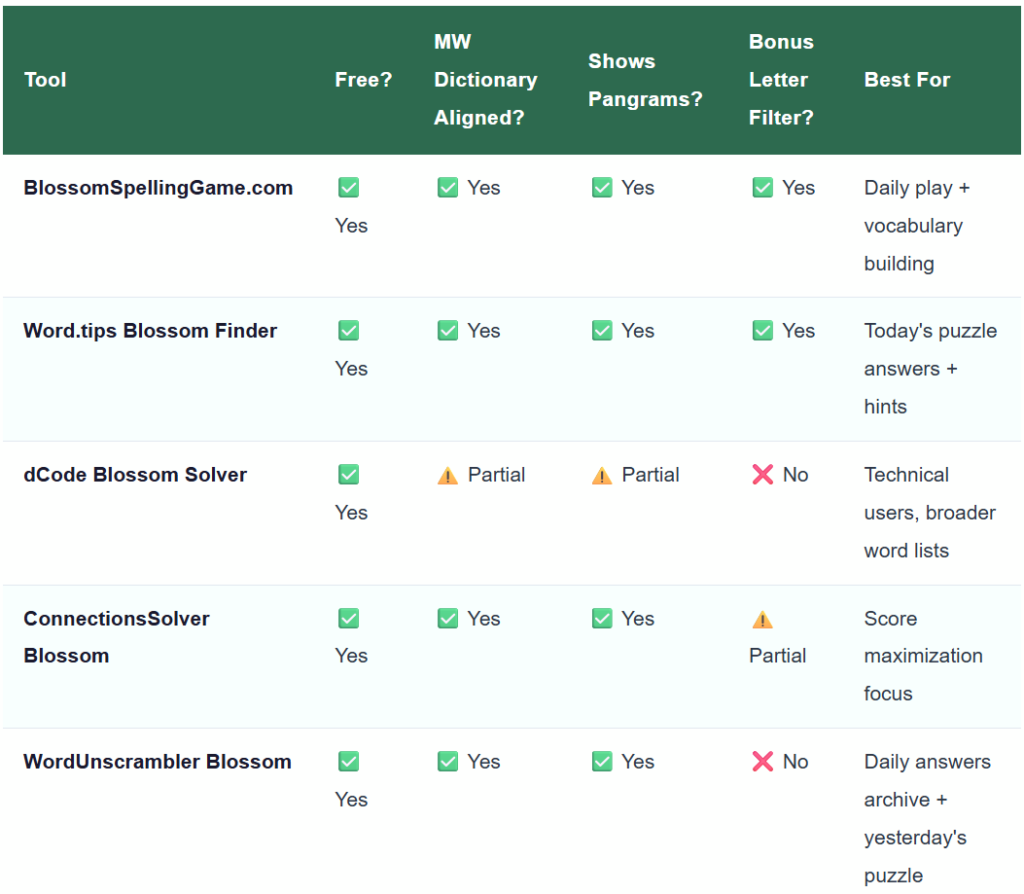
A practical warning: avoid any blossom word finder that doesn’t let you specify the center letter separately, shows no point values, or floods you with clearly invalid words. Those tools are often built for SEO purposes, not actual gameplay utility. They look similar on the surface. They’re not.
Every reliable blossom word finder online is free. You don’t need to pay for any tool to solve today’s puzzle. If a site is pushing you toward a paid plan just to see a word list, there are better free alternatives available — like BlossomSpellingGame.com, which offers a free, clean blossom word finder with letters that works on any device.
Today’s & Yesterday’s Puzzle: How to Find Answers Responsibly
Let’s address the obvious: people search for “blossom word finder today” and “blossom word finder yesterday” constantly. There’s no judgment here. Daily streaks matter. Life gets busy. Sometimes you just need to know the pangram so you can move on with your morning.
Finding Today’s Answers
The most accurate source for today’s blossom word finder answers is — unsurprisingly — any tool calibrated to Merriam-Webster’s daily puzzle. Sites like word.tips/blossom-word-finder and BlossomSpellingGame.com update every morning with the current day’s letters and solutions. They typically show:
- Today’s center letter and petal letters
- All valid words, sorted by length and score
- Today’s pangram(s), clearly marked
- The bonus petal letter for maximum scoring
Finding Yesterday’s Answers
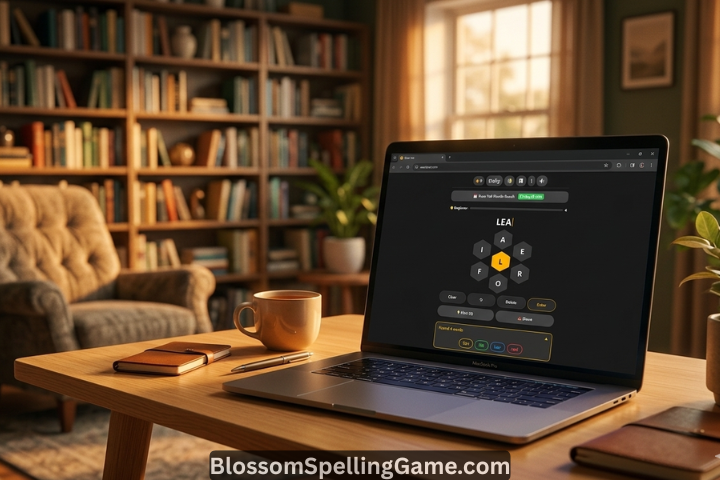
If you played yesterday’s puzzle and want to check what you missed, You can click on “View Full Month Result” . BlossomSpellingGame.com maintains a solid historical archive of blossom word finder answers going back months. This is genuinely useful — not just for curiosity, but for learning. Words that appear in one puzzle often reappear (in different configurations) in future ones. Reviewing yesterday’s answers is, in a real sense, practice.
The Ethical Question (It Comes Up)
Some Blossom players feel vaguely guilty using a finder. I’d push back on that a little. The game doesn’t have a leaderboard. There’s no competitive ranking. You’re playing against your own vocabulary and curiosity. Using a blossom word solver to finish a puzzle is more like checking the crossword solution in the newspaper than anything that damages the experience — especially if you take 30 seconds to learn the words you didn’t know before looking.
Some Mistakes Beginners Make (And How to Avoid Them)
Most beginner errors in Blossom are completely predictable. Here are the six I see most often — and the quick fixes for each.
Ignoring the Center Letter Requirement
Always check that the center letter is in every word before submitting — it’s mandatory, and the most common source of rejected entries. Our Center Letter Guide explains how to make it work for you rather than against you.
Submitting Proper Nouns
Blossom only accepts common dictionary words. No names, no places, no brand names. A common version of this: seeing the letters T-E-X-A-S and trying “Texas.” Rejected. Or spotting what looks like a name. The rule is consistent — if it’s capitalized in normal usage, it won’t work.
Using a Generic Word Finder Instead of a Blossom-Specific One
A general anagram solver or word unscrambler doesn’t know Blossom’s rules. It’ll give you words that don’t include the center letter. It’ll show you 3-letter words that are too short. It won’t tell you which words include the bonus petal letter. Use a blossom-specific tool. The difference in usefulness is significant.

If you’re coming from the NYT Spelling Bee, Blossom will feel familiar but plays by different rules in meaningful ways. See our full comparison for a breakdown.
Frequently Asked Questions About the Blossom Word Finder
What is a blossom word finder and how does it work?
Is using a blossom word solver cheating?
Where can I find today’s blossom word finder answers?
Can I find yesterday’s blossom puzzle answers?
How do I find the blossom pangram?
Does the blossom word finder work with the bonus petal letter?
Is the blossom word finder free to use?
Can I use a blossom word finder with just the letters (not a specific puzzle)?
Why does my word finder show words that Blossom rejects?
What’s the difference between a blossom word helper and a blossom word solver?
Final Thoughts: Let the Blossom Word Finder Work For You
Here’s the truth about using a blossom word finder: it’s not about skipping the game. It’s about getting more out of it. The people who use these tools well aren’t the ones who paste answers and move on — they’re the ones who see an unfamiliar word, look it up, and file it away for next time.
Blossom is a genuinely well-designed daily puzzle. Merriam-Webster built something that’s casual enough for a five-minute morning habit, but deep enough to reward serious vocabulary study. Whether you’re a complete beginner just learning the rules or a daily player pushing for a higher streak, the blossom word finder is a useful part of your toolkit — not a replacement for thinking, but a way to think better.
Use it wisely, learn from what it shows you, and enjoy the process of watching your scores climb over time. The pangram will come. It always does — eventually.